- DATE:
- AUTHOR:
- S&P Global
May 2026 S&P Capital IQ Pro Preliminary Release Notes
S&P Capital IQ Pro Release Highlights
In this release, we added new datasets and tools on Capital IQ Pro, designed to enhance our clients' daily workflows:
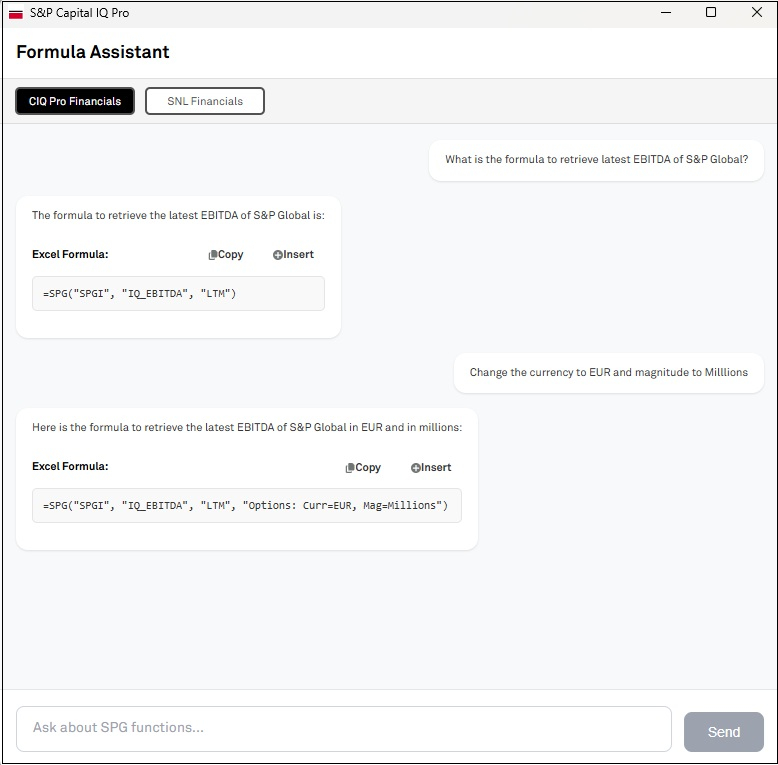
S&P Capital IQ Pro Plug-in: The new Formula Builder AI Assistant empowers users to quickly generate SPG formula syntaxes in the S&P Capital IQ Pro Plug-in using GenAI.
Private Company Coverage: Expanded coverage of Thailand private companies with additional firmographics, financials, and officers & directors data.
Document Intelligence: Introduced Fund documents to Document Intelligence, allowing users to easily search for and access fund-related documentation.
Investment Research: Pareto Securities research, with over 62,700 reports, is now included in the Aftermarket Research collection, expanding global coverage for AMR license holders.
Insurance: Launched the U.S. Insurance Manual Library, offering a comprehensive digital archive of analyst-curated competitor rates, rules, and form manuals for enhanced insurance pricing and product analysis.
S&P Capital IQ Pro Plug-in
In this release, we introduced the Formula Builder AI Assistant in S&P Capital IQ Pro Plug-in, empowering users to seamlessly create SPG formula syntaxes using GenAI capabilities. Additionally, we have enhanced the right-click functionality in the S&P Capital IQ Pro Plug-in, enabling users to edit their SPG and CIQ formulas directly within the Formula Builder.
Formula Builder AI Assistant
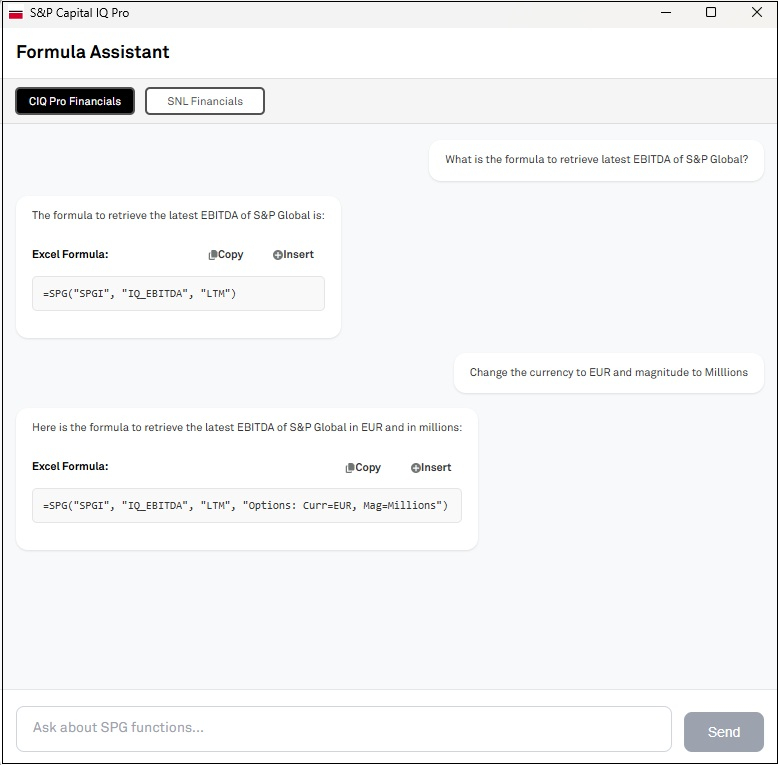
Users can now use Formula Builder AI Assistant in S&P Capital IQ Pro Plug-in to build =SPG( formulas using natural language prompts. The AI Assistant currently supports datasets including company details, financials, market data, and trailing & forward multiples.
Find it in the platform:
In Excel, click on Sign Out in the S&P Capital IQ Pro Plug-in top ribbon, then Sign In again
Close Excel and reopen it
In the S&P Capital IQ Pro ribbon, click on the Formula Builder AI Assistant
Enter your request using natural language
E.g: What is the latest year’s EBITDA of S&P Global?
‘What is the primary industry of S&P Global?’
Copy the formula syntax generated by the AI Assistant and paste it into your desired Excel cell
Excel Template Library
In this release, we added several new or enhanced Excel templates to meet your data analysis needs.
Power Plant Capacity by Owner Summary
This model allows users to look at aggregate plant capacities at the ultimate parent level, with the ability to filter by fuel type, location, etc.
A comprehensive model providing CDS spreads, equity performance, and credit ratings. Features include top/bottom movers, rating changes, market data highlights, and detailed CDS summaries for selected entities.
CIQ to VA Estimates Metrics Mapping
The template provides a structured mapping of Visible Alpha field names to corresponding CIQ Pro field names across industries. Use industry tabs to view mappings, relevant data, and links to additional industry-specific VA line items.
This model provides insight into an Issuer's Fixed Income Security Issuance at the Summary and Detail level and includes current pricing, analytics, reference and schedule data.
View estimate summary information including details by broker and create custom consensus estimates.
Power Forecast Renewable Valuation
This model compares annual projected renewable power plant earnings from the Power Forecast with user-defined revenue requirements at the state level, supporting asset valuation and PPA price benchmarking
Document Intelligence
In this release, we added Fund documents in Document Intelligence, enabling users to easily access fund-related documentation.
Fund Documents in Document Intelligence
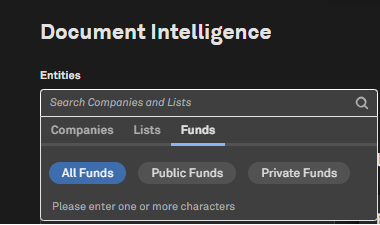
Users can now search for Fund documents in Document Intelligence.
Find it in the platform:
Navigate to the Documents tab in the top navigation to access the Document Intelligence page
Open the Entities filter, select the Funds tab, and search for the required funds
Private Markets & Private Company
In this release, we expanded our private company data coverage for Thailand, offering additional firmographics, financials and officers & directors data for small and medium enterprises.
Financials and Firmographics for Thailand Private Companies
Users can access additional financials & firmographic data for small and medium enterprises in Thailand, significantly enhancing coverage in this geography.
Find it in the platform:
Search and select a Thailand private company in the top search to navigate to its Corporate Profile
In the left-hand navigation, navigate to Financials > Templated
Coverage stats:
73k private companies
Directors & Officers data for Thailand Private Companies
Users can access additional officers and directors for small and medium enterprises in Thailand, significantly enhancing coverage in this geography.
Find it in the platform:
Search and select a Thailand private company in the top search to navigate to its Corporate Profile and scroll down to view the Officers & Directors widget
In the left-hand navigation, navigate to People Summary
Coverage stats:
237k private companies
Investment Research
In this release, we are pleased to announce that research from Pareto Securities is now available in the S&P Global Aftermarket Research (AMR) collection. Pareto Securities’ research has been available on the Capital IQ and Capital IQ Pro platforms as Real-Time Research since 2007, and now over 62,700 reports are available to users with an AMR license. This addition broadens our Aftermarket Research coverage, offering users greater global insights.
Additionally, we introduced multi-document ChatIQ on the Investment Research page, offering the same conversational experience as Document Intelligence to ensure a consistent workflow and faster access to insights.
Pareto Securities Is Now Available in S&P Global’s Aftermarket Research Collection
Pareto Securities further enhances the value of our Aftermarket Research collection. With their addition as a contributor, users now have access to Pareto Securities’ Nordic research content on the Aftermarket Research platform. Their team of 39 publishing analysts covers 257 companies across Industrials, Energy, Financials, Consumer, Technology, Materials, Healthcare, Utilities, and Telecommunications.
Find it in the platform:
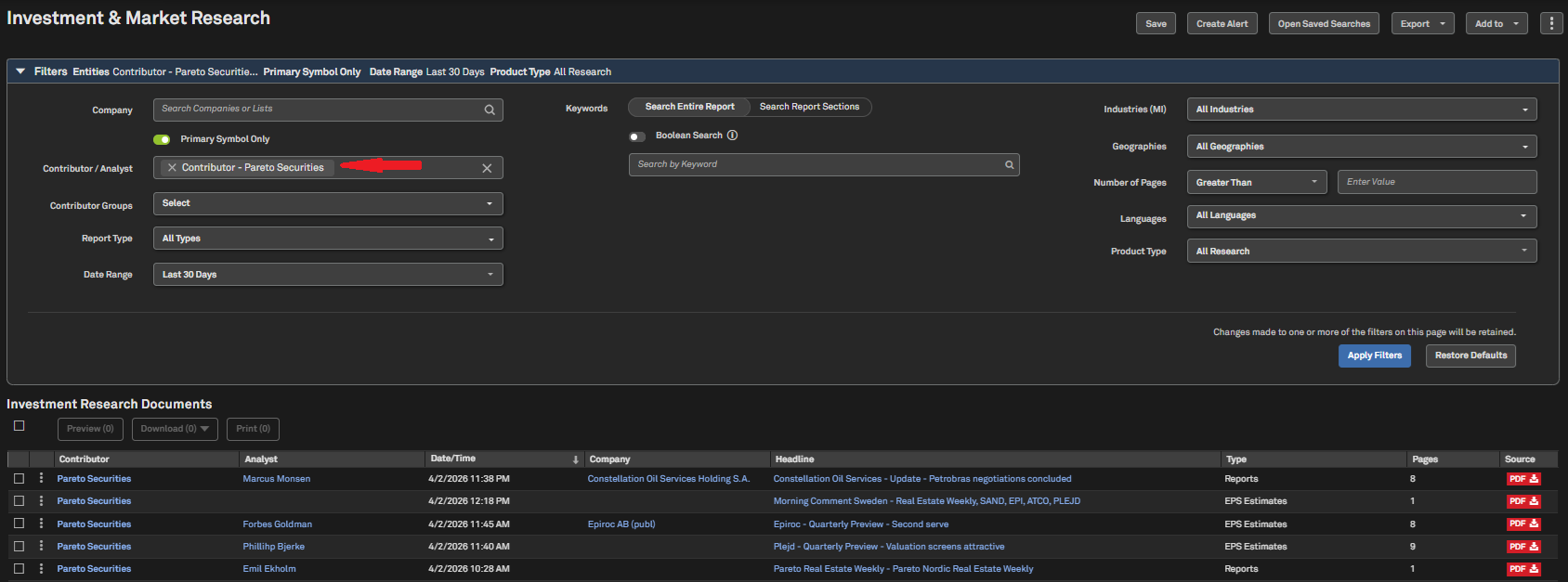
Navigate to the Research tab in the top navigation and click on Investment & Market Research
In the Contributor/Analyst filter, search for Pareto Securities and click Apply Filters
Pareto Securities Aftermarket Research collection is also available in Document Intelligence, Dashboard, Corporate Profile, and Alerts
Coverage stats:
Pareto Securities coverage includes more than 45 million reports from over 1,800 investment banks and independent research providers, including J.P. Morgan, UBS, Jefferies, Barclays, Citigroup, ABG Sundal Collier
Note: Access to Aftermarket Research data requires an additional subscription, please contact your account team for details.
Insurance
In this release, we introduced the U.S. Insurance Manual Library functionality on S&P Capital IQ Pro, transitioning it from the legacy ratefiling.com platform. The Manual Library is a digital archive that consolidates thousands of filings into complete, structured manuals, offering analyst-curated competitor rates, rules, and form manuals for insurance pricing and product analysis.
U.S. Insurance Manual Library
Users now have access to a digital archive of competitor rates, rule manuals, and forms libraries. Maintained manuals are updated regularly and feature clear status indicators to support efficient regulatory and competitive workflows. Additionally, users can submit ad hoc requests to create custom manuals for specific groups, lines of business, and states.
Find it in the platform:
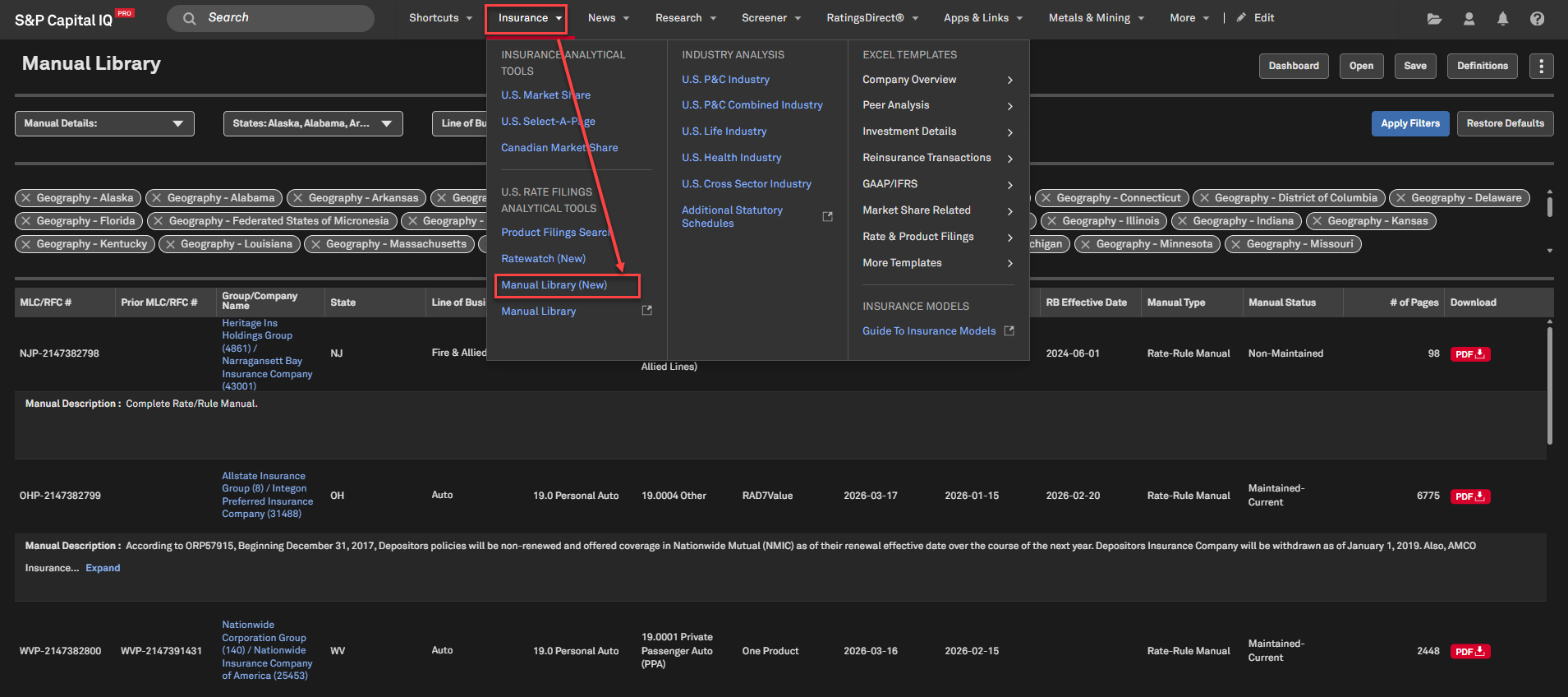
Navigate to the Insurance tab in the top navigation
Select Manual Library (New)
Coverage stats:
US Insurance companies that report to NAIC/individual Department of Insurance
S&P Capital IQ Pro Labs
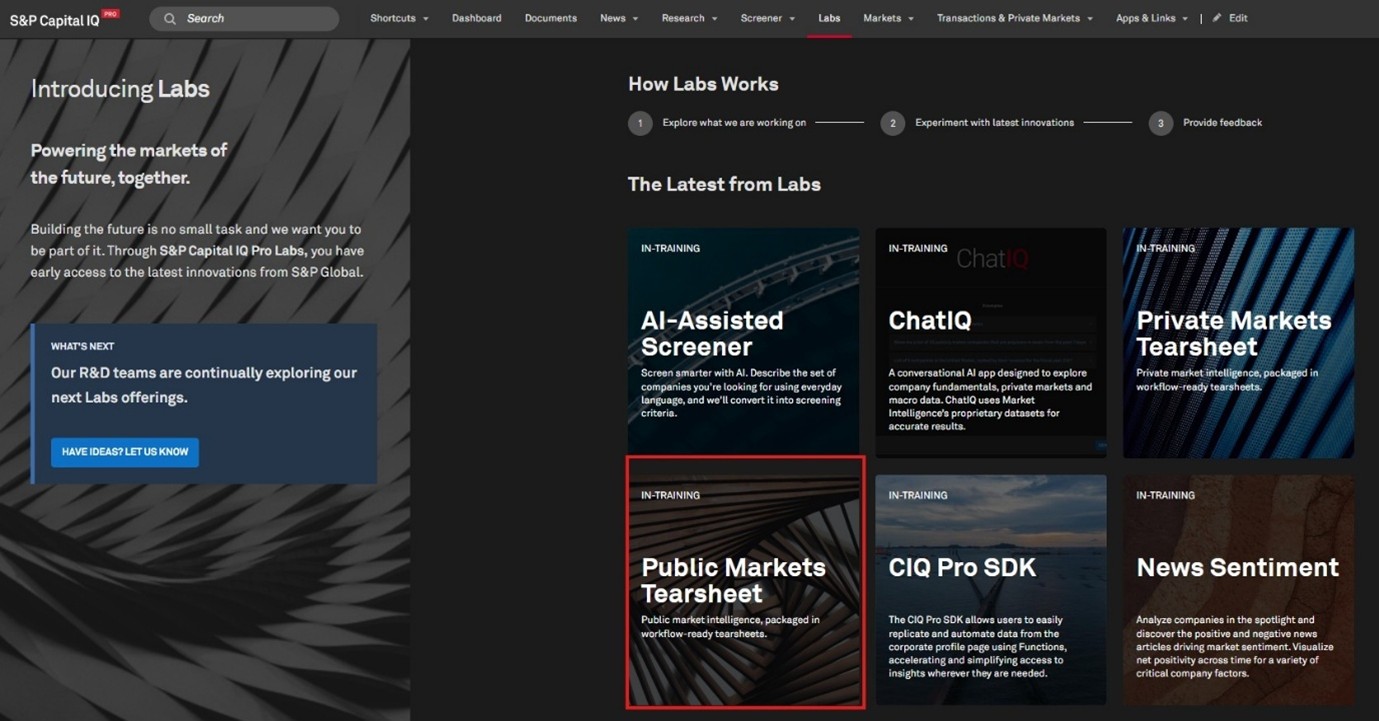
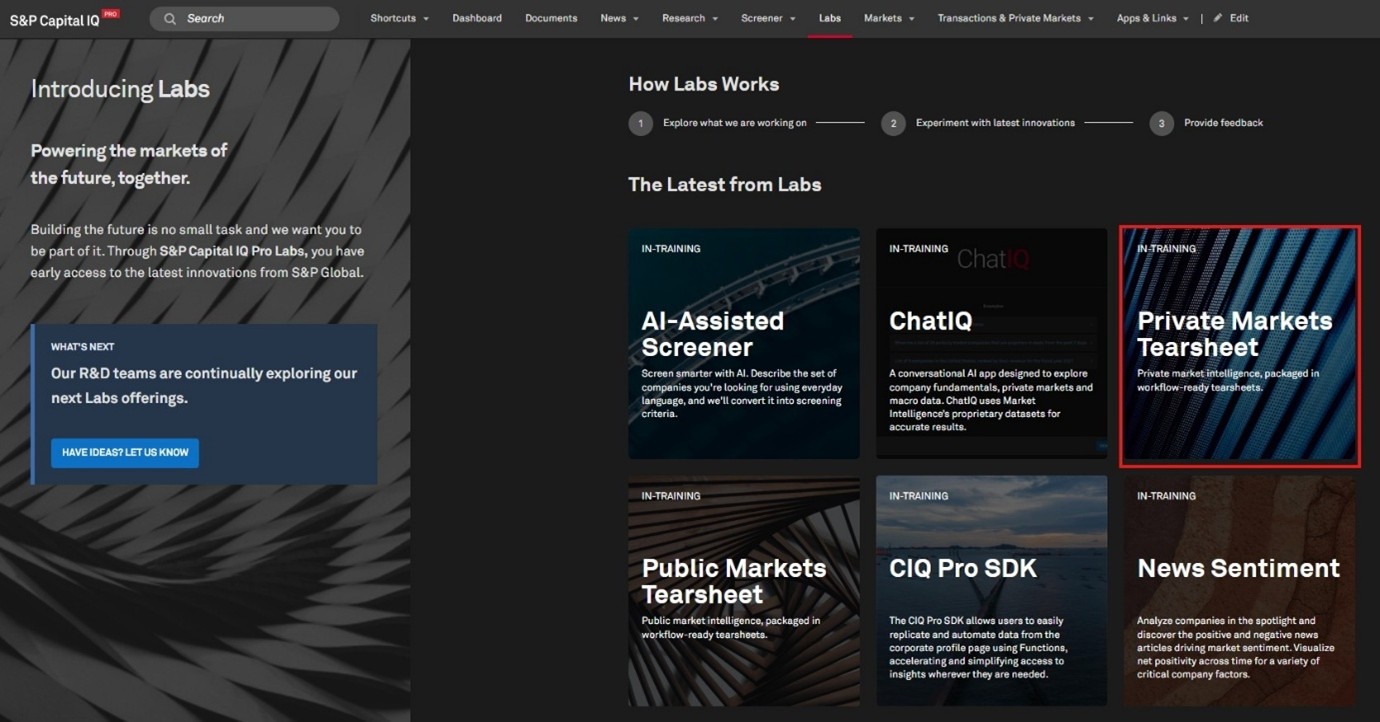
In this release, we introduced a new tile for Private Markets Tearsheet, offering a structured framework for understanding private company growth, valuation, and capital formation, leveraging proprietary S&P Global datasets. Additionally, we launched Public Markets Tearsheet, a workflow-ready tear sheet experience for monitoring the global public equity landscape through S&P Global’s quantitative lens. It consolidates multiple pillars of market intelligence, including sell-side estimates, factor signals, earnings call analytics, and thematic indicators, into a single, regularly refreshed view.
Private Markets Tearsheet
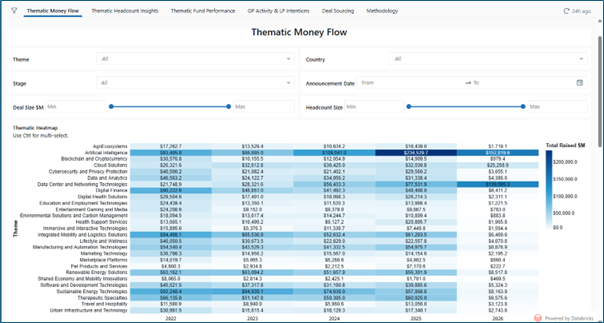
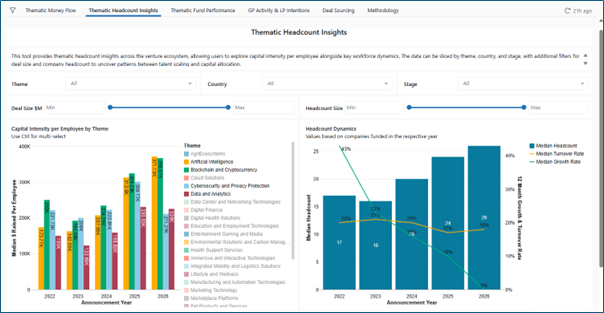
The Private Markets Tearsheet integrates key signals from across the private markets ecosystem, including thematic capital flows, workforce and headcount trends, funding rounds, general partner (GP) activity, limited partner (LP) intentions, signal-driven deal sourcing, and fund performance, providing actionable insights and a holistic view of market dynamics.
Updated on an ongoing cadence, this experience enables users to identify where private market momentum is building, recognize themes attracting sustained investment, and understand how early-stage signals translate into later-stage outcomes. These tear sheets are built to support sourcing, benchmarking, and forward-looking insight into the companies shaping the next cycle of market leadership.
Find it in the platform:
Navigate to Labs from the top navigation
If it's not visible, click Edit on the right side of the top navigation and add Labs from the Additional Menu Items and click Save
When in Labs, select the tile Private Markets Tearsheet
Public Markets Tearsheet
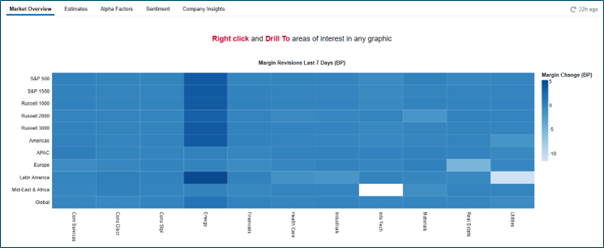
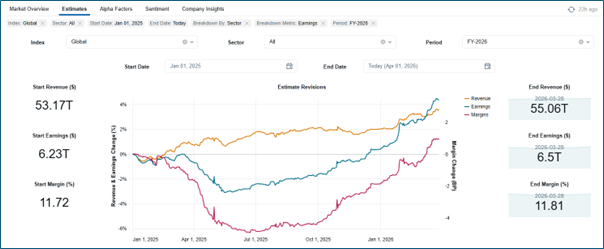
Within the Public Markets Tearsheet, users can track how expectations are evolving across sectors and regions, where earnings revisions and margin dynamics are concentrating, and how narrative and fundamentals intersect in real time. From systematic alpha factors to transcript-derived signals and consensus forecasting, these tearsheets are designed to support idea generation, portfolio monitoring, and timely investment decision-making.
Find it in the platform:
Navigate to Labs from the top navigation
If it's not visible, click Edit on the right side of the navigation and add Labs from the Additional Menu Items and click Save
When in Labs, select the tile Public Markets Tearsheet